The app blocker with friends built in
Lock In Squad is a free app blocker for iPhone and Android that you use with your friends. Each of you blocks your own distracting apps, then you lock in together and live standings show who stays locked in longest. You can also keep friend streaks, race on a weekly leaderboard and win the crown for the week.
What an app blocker with friends does
You pick the apps that pull you away, such as TikTok, Instagram or a game, and Lock In Squad blocks them on your phone while you're locked in. Your friends do the same on their own phones. A group lock-in puts all of you on one screen, so everyone sees who is locked in right now and for how long. Each person still picks their own apps and decides when to lock in, so nobody can block anyone else's apps.
How a group lock-in works
- Make a free account. Blocking works as a guest, but friends and group lock-ins need an account.
- On the Social tab, tap Start a group lock-in and name it, such as Study hall, or tap Lock in together on a friend's profile.
- Tap Invite friends to invite people from your friends list, or tap Share invite link and send it in any chat. Anyone with the link and a free account can join, even if you aren't friends yet.
- A friend without the app can still open the link. It goes to a page with the App Store and Google Play buttons, and once they install the app and make an account, the link lets them join.
- Everyone taps Lock In on their own phone, and each person's apps stay blocked until they hold the Lock Out button.
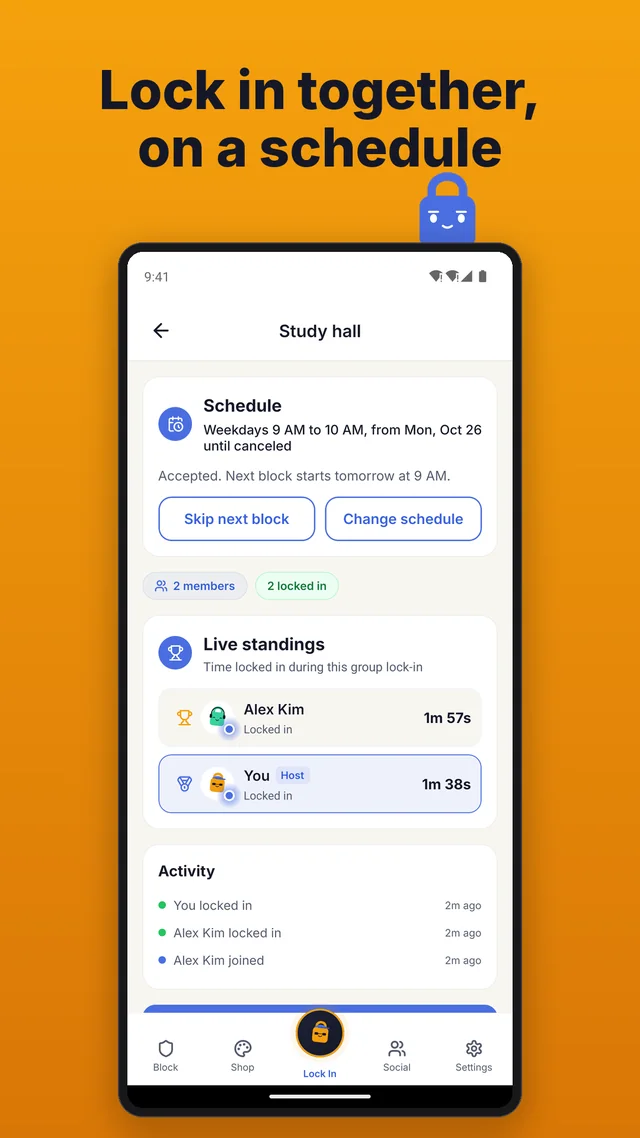
- The live standings rank everyone by time locked in and mark each person as Locked in or Idle. A feed below shows who locked in, locked out, joined or left.
- The person who started it taps End group lock-in to end it for everyone and save the final standings. Whoever had the most time gets a group win in their friends' Activity.
If someone unlocks early
To quit early, you hold the Lock Out button for the seconds you set in Settings, up to 30. Your apps open, your row switches to Idle and your time stops adding up, while everyone else stays locked in and the group lock-in keeps going. The feed shows that you locked out, and you can tap Lock In again later to add more time to your total. A timer reaching zero doesn't unlock anything either, since the app shows Goal completed and keeps counting until you hold Lock Out.
Friend streaks, the weekly leaderboard and the crown
Friend streaks
Open a friend's profile and tap Start a streak. Once they accept, it grows each day you both lock in, counting only the focus days you both picked, and goes back to zero if one of those days passes without both of you locking in.
The weekly leaderboard
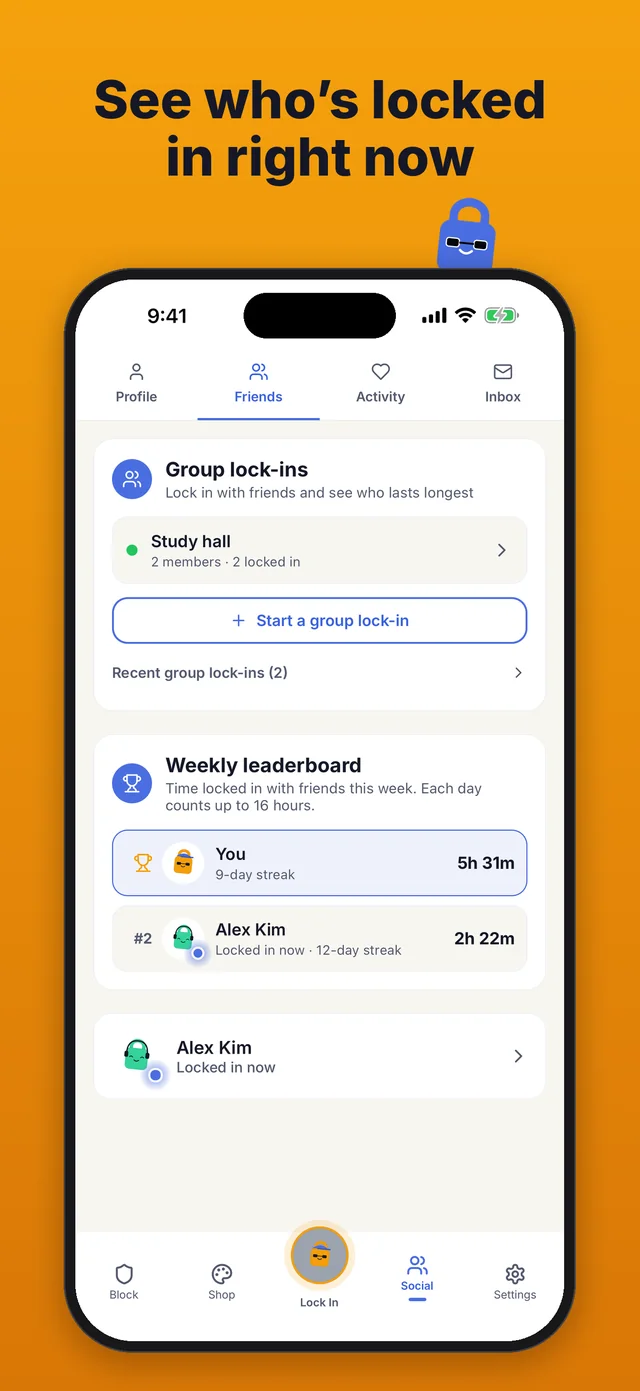
The Friends page of the Social tab ranks you and your friends by time locked in from Monday to Sunday, with each day counting up to 16 hours. A glowing dot on a friend's picture means they're locked in now, and you can nudge a friend who hasn't started or cheer on one who has.
The weekly crown
Finish the week with the most time on your friends board, with at least one friend locked in too, and you win the week. Your friends see a crown next to your name all the next week, and your profile counts the weeks you've won. A tie for first still wins, and the crown comes with no minutes or money.
Group schedules for set times
A group that locks in at the same time each week can put it on a schedule. The person who started the group lock-in sets the times, once or weekly on the days they pick. Once a member accepts, the apps they chose on their own Block tab are blocked at those times, even with the app closed, and the time counts in the group's standings. Members can skip the next block, or leave the schedule and stay in the group.
iPhone and Android friends in one group
Friends, group lock-ins, friend streaks, the leaderboard and the crown work the same on iPhone and Android, so one group lock-in can mix both. Blocking follows each phone's own rules: on iPhone you choose apps and whole categories in Apple's Screen Time picker, and on Android you pick from the list of apps on your phone.
Every feature is free
Everything on this page costs nothing. Ads pay for the app, and they never show during a lock-in or after a timer you finish. A one-time $4.99 Premium purchase removes them, with no subscription. Each minute locked in earns 1 minute for the Shop, where you dress up your lock, and a group lock-in earns the same as locking in alone.
How it differs from a solo app blocker
A solo app blocker puts a pause between you and your apps, and you're the only one who knows whether you held out. Lock In Squad keeps that pause, the hold on the Lock Out button, and adds people you know. Your friends see your row switch to Idle when you lock out, the weekly board turns time locked in into a race, and a friend streak grows only when both of you show up.
Keep reading
Studying with a group? Read how to study with friends with your phones locked, or see Lock In Squad as an app blocker for students. You can also walk through how it works, compare it with other blockers on Why Lock In Squad? or go back to the Lock In Squad home page.
Questions
Is Lock In Squad free?
Yes. Every feature, group lock-ins and friend streaks included, is free on iPhone and Android. Ads pay for the app and never show during a lock-in, and a one-time $4.99 Premium purchase removes them, with no subscription.
Do my friends need the app?
Yes. Each friend needs Lock In Squad and a free account, since their own phone blocks their own apps. A friend without the app can still open your invite link, which goes to a page with the App Store and Google Play buttons and lets them join once they install the app.
Can iPhone and Android friends lock in together?
Yes. Friends, group lock-ins, friend streaks, the leaderboard and the crown work the same on both, so one group lock-in can mix iPhone and Android.
Does it block my friends' apps or only mine?
Only yours. Each person picks the apps to block on their own Block tab and locks in on their own phone. A group schedule blocks a member's apps only after that member accepts its times.
What happens if someone quits early?
They hold the Lock Out button and their apps open. Their row switches to Idle and their time stops adding up, while everyone else stays locked in. They can lock in again later to add more time.
Do we get anything for locking in together?
There is no bonus. Each minute locked in earns 1 minute for the Shop, the same as alone. Finish the week with the most time on your friends board, with at least one friend locked in too, and a crown sits next to your name all the next week.
Lock in with your friends
A free app blocker for iPhone and Android, with group lock-ins and no subscription.