Why Lock In Squad?
Lock In Squad is a free app blocker for iPhone and Android, with no subscription. Your chosen apps stay blocked while you're locked in, and quitting early takes a hold on the Lock Out button. You can lock in on your own or with your friends in a group lock-in. Below are the story behind it and a comparison with BePresent, Opal, Forest, Screen Time and eight other options.
The Story Behind Lock In Squad
From a stopwatch and a spreadsheet to an app
Lock In Squad was inspired by a friend at Swarthmore who tracked focus time manually with a stopwatch and Google Sheets, starting the clock for work and stopping it for every break.
The creator, Eli, adopted this method and has been logging every minute of focus time since March 2024.
- 1.Manually logging to spreadsheets was tedious and prone to error
- 2.Phone distractions kept breaking focus: start stopwatch, work 2 minutes, stop to check phone, repeat
- 3.The blockers Eli tried were either too strict, with no way out, or too easy to ignore, like the Ignore Limit button in Screen Time on iPhone
After months of dealing with these frustrations, Eli spent more than a year building Lock In Squad to solve them:
Automatic Tracking
Sessions log themselves and your stats add up on their own, with no spreadsheet or manual timer.
Smart App Blocking
Block distracting apps with conscious friction. You can still end a session early, after a hold that gives you a moment to reconsider.
"That moment of pause can interrupt a doomscroll. If you really need to stop, great! If not, you've given yourself the space to make a better choice."
Eli, founder
The Battle Inside Your Brain
The Instant Gratification Monkey
As Tim Urban explains in his viral TED talk, procrastinators have an Instant Gratification Monkey in their brain that grabs the wheel and only cares about what is easy and fun right now.
The Panic Monster wakes up when a deadline gets close. On tasks with no deadline he never shows up at all, which leaves the monkey in charge unless something like Lock In Squad's hold gets in the way.
Your Life in Weeks
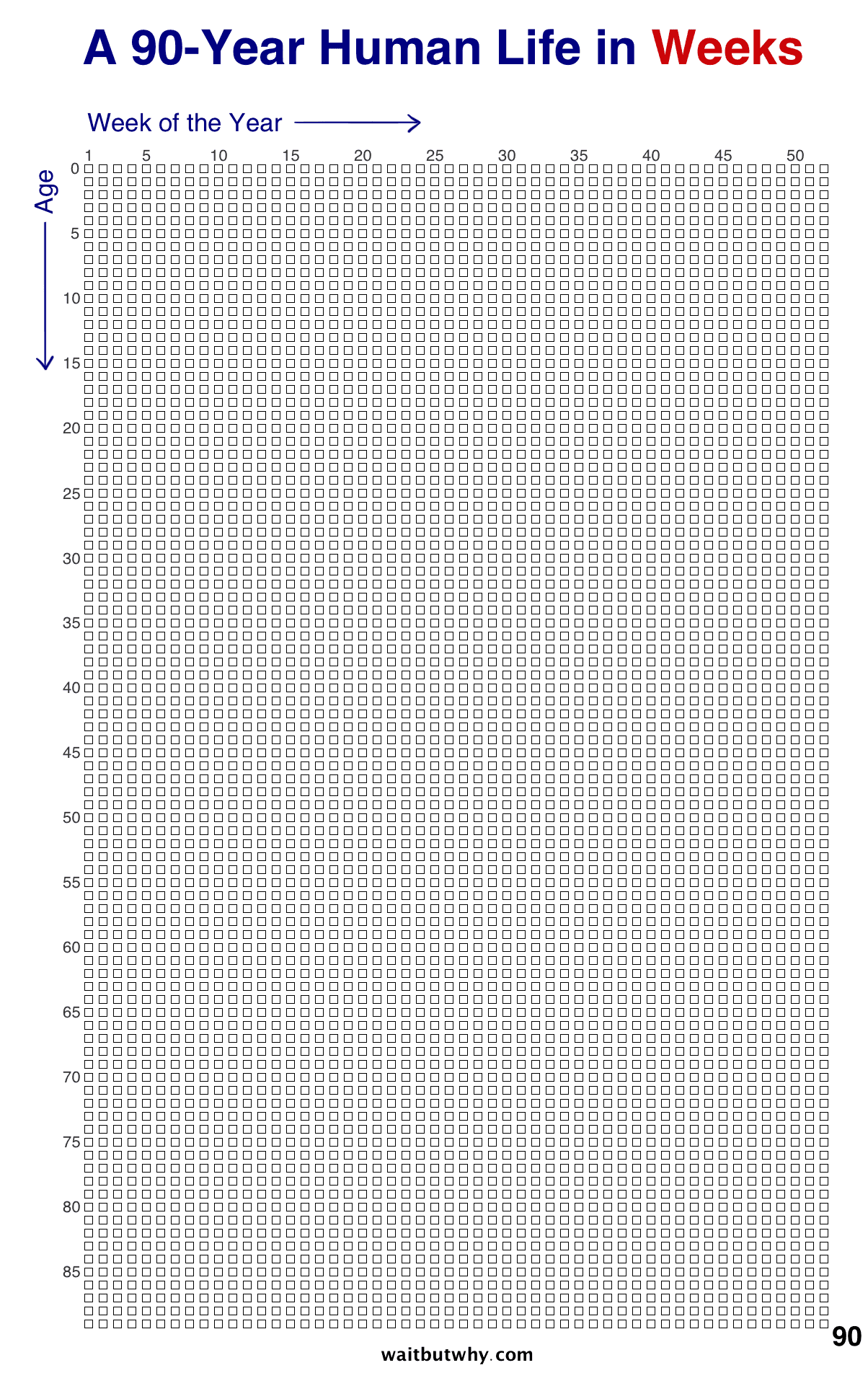
Tim Urban's "Your Life in Weeks" visualization shows a life of 90 years as just 4,680 weeks. Each box is one week.
Seen this way, every week counts. Lock In Squad helps you spend fewer of them on your phone.
Lock In Squad's Solution: Conscious Friction
Lock In Squad puts a deliberate pause between the urge to quit your lock-in and actually quitting. To end a lock-in early, you hold the Lock Out button for the time you set, 5 seconds on a new account and up to 30, and that hold makes you ask: "Do I really need this right now, or am I just avoiding work?" This conscious distance helps your rational brain override the Instant Gratification Monkey.
What Makes Lock In Squad Different?
Here is what we kept from other focus apps, and what we do differently.
Competitor Problem:
Opal Pro costs $99.99 a year. Freedom Premium is $8.99 a month. BePresent Premium starts at $24.99 a year. Cold Turkey Pro is $45 once, but only on desktop. Many blockers put features like scheduling or an allow list behind a paywall.
Lock In Squad's Promise:
- Every feature is free
- Up to 5 schedules and the whitelist mode, Allow only these apps, cost nothing
- Lock In Squad's free version can show an ad after you end a stopwatch lock-in or quit a timer early, never during a lock-in or after a timer you finish
- No ads in your first 3 lock-outs or after a lock-in under 30 seconds. After that, an ad shows at most every other time, at least 3 minutes apart
- A single $4.99 payment removes ads for good, with no subscription
Analytics included:
- Daily, weekly and lifetime focus stats
- Streak tracking to build consistency
- Charts of your focus time over a week, a month, 90 days or a year
- Minutes to spend on cosmetics in the Shop
Email newsletter:
An optional newsletter with focus tips.
Lock In Squad also keeps a record of when and how long you focused, so you can watch your habits change over time.
- Start a group lock-in and follow the live standings while you and your friends lock in together
- Invite friends in the app or with a link, which friends without the app can open too
- Keep a friend streak going on the focus days you share
- The weekly leaderboard ranks you and your friends by time locked in, and each week's winner wears a crown
Of the apps compared below, Forest and BePresent also run group sessions. Forest's Plant Together grows one tree for the group, and BePresent offers group sessions and weekly leaderboards.
How Lock In Squad Compares
See how Lock In Squad stacks up against the biggest competitors and the tools built into your phone.





| Feature | Lock In Squad | BePresent | Forest | AppBlock | iPhone Screen Time | Android Wellbeing | RescueTime | Opal | Freedom | Stay Focused | Cold Turkey | Brick | Bloom |
|---|---|---|---|---|---|---|---|---|---|---|---|---|---|
| Free Core Features | Yes | Partial (basic blocking) | Yes | Partial (with limits) | Yes | Yes | No | Partial (1 rule) | Partial (Start Now sessions only) | Partial (paid upgrades) | Partial (websites only) | No | No |
| Group Sessions With Friends | Yes (group lock-ins, live standings) | Yes (Group Sessions) | Yes (Plant Together) | No | No | No | No | No | No | No | No | No | No |
| Other Friend Features | Friend streaks, weekly leaderboard and crown | Weekly leaderboards (Premium) | Friends leaderboard | Streak friends (iPhone), approval partner (Premium) | No | No | No | Shared screen time and leaderboard (iPhone) | No | Friend Approval for Strict Mode (iPhone) | No | No | Focus streak leaderboard |
| Whitelist Mode | Yes | Not listed | Yes (Forest Plus) | Yes (Premium) | Downtime only | No | No | Yes (Pro) | Websites only (Mac, Windows) | Yes | Websites (apps need Micromanager) | Yes (iPhone) | No |
| Hold to Unlock | Yes | Not listed | No | No | No | No | No | No | No | No | No | No | No |
| Gamification (minutes or points) | Yes | Yes | Yes | No | No | No | No | Yes | No | No | No | No | No |
| Bonus Time After Timers | Yes | Not listed | No | No | No | No | No | No | No | No | No | No | No |
Prices and features checked on November 1, 2026. Sources: BePresent, Forest, AppBlock, RescueTime, Opal, Freedom, Stay Focused, Cold Turkey, Brick, Bloom, BePresent on the App Store, Forest's features, AppBlock's streak friends, Opal's friends help, Stay Focused on the App Store, Freedom's features.
Questions
What is the best free app blocker?
Pick the one whose free tier has the fewest limits. Of the apps compared here, Lock In Squad and Forest both block phone apps for free, and Lock In Squad makes you hold a button to quit early. Opal, Freedom, AppBlock and BePresent cap their free plans, and Cold Turkey's free version blocks only websites on a computer.
Which app blockers let you lock in with friends?
Of the apps compared here, Lock In Squad, Forest and BePresent let friends block their apps at the same time. Lock In Squad's group lock-ins show live standings, and friends without the app can open the invite link. Forest's Plant Together grows one tree that dies if anyone gives up, and BePresent has group sessions and weekly leaderboards.
Can you bypass Screen Time?
Yes, and by default nothing stops you. Apple's iPhone guide says Screen Time limits can be ignored once reached. A Screen Time passcode closes that door only if a friend or parent sets it, because if you know the code you can approve more time yourself.
Why use an app blocker instead of Screen Time?
Because Screen Time measures phone use better than it stops it. Screen Time's reports show your pickups and which apps take your hours, but a blocker keeps those apps closed. Lock In Squad blocks them for a whole session, makes you hold a button to quit early, and rewards you with streaks and earned minutes, which Screen Time lacks.
Ready to lock in?
Free on iPhone and Android, with no subscription. Block your apps, then lock in with your friends.