By Eli Young, founder of Lock In Squad · Published · Updated
The 6 Best App Blockers in 2026
The six best app blockers in 2026 are Lock In Squad, Opal, Forest, Freedom, Cold Turkey and the Screen Time or Digital Wellbeing tools already on your phone. Each entry below gives its price as of November 1, 2026 and where it is strong or weak. We make Lock In Squad, so read that entry with this in mind.
An app blocker is one of the most direct ways to take your attention back from a phone that is designed to hold it. In a 2025 randomized trial, blocking mobile internet for two weeks improved people's measured ability to sustain attention, and 91% of participants improved on at least one of the three outcomes measured (attention, mental health and well-being).
1. Lock In Squad, free on iPhone and Android
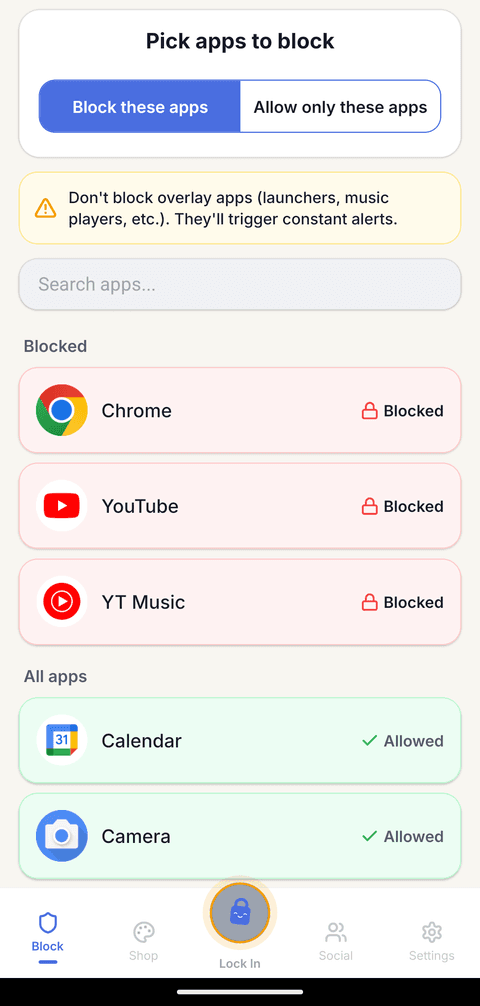
Lock In Squad blocks distracting apps with conscious friction. Ending a lock-in early means holding a button for the time you set, 5 seconds on a new account and up to 30, which interrupts the autopilot reach without trapping you. Every Lock In Squad feature is free on iPhone and Android, including a timer or stopwatch for each lock-in, up to 5 schedules that block apps at set times, automatic stats with a heatmap and streaks on the focus days you choose.
Lock In Squad is also built for friends. You can start a group lock-in and follow the live standings, invite friends with a link that friends without the app can open, keep a friend streak going and compete on the weekly leaderboard, whose winner wears a crown.
- Price: Every feature is free, with no subscription. An optional $4.99 purchase, paid once, removes ads.
- Best for: Anyone who wants real blocking, stats and streaks without a paywall, and friends who want to lock in together.
- Watch out: Lock In Squad has no app for computers and no daily time limits for single apps.
2. Opal, a polished screen time app
Opal runs on iPhone, Android and Mac, with an Opal Score and focus reports. Opal's free plan gives you one rule (a schedule, time limit or open limit) and block lists only. Opal's allow list and Hard Mode, which won't let you turn Opal off, come with Opal Pro at $99.99 a year. On iPhone, Opal friends can share their daily screen time, and Opal's App Store listing describes a leaderboard for challenging friends, while Opal's help pages say Android and Mac have no social features.
Lock In Squad vs Opal, side by side
3. Forest, the gentle gamified option
Forest grows a virtual tree while you focus, and Forest's free Deep Focus mode blocks other apps during the session. Forest is charming and good for light accountability, since the tree dies if you give up early. Forest's free Plant Together runs one focus session for a group of friends, and everyone's tree dies if one person gives up. Forest is free on iPhone and Android, and a custom app allowlist needs Forest Plus, which costs $5.99 a month or $35.99 a year.
Lock In Squad vs Forest, side by side
4. Freedom, best for desktop and syncing across devices
Freedom syncs blocks across phone, tablet and computer, which makes it a strong pick if your distractions live on a laptop too. Freedom's free plan only runs sessions you start on the spot, up to 2 hours, with no scheduling or Locked Mode. Freedom Premium costs $8.99 a month, $39.99 a year or $199 for life (recently $99.50 on sale). Freedom has no hold to unlock, and Freedom's help pages list blocking everything except chosen sites for Mac and Windows only. Freedom also has no friends features, and its site says it has no streaks, points, leaderboards or rewards.
Lock In Squad vs Freedom, side by side
5. Cold Turkey, strongest desktop blocking
If your problem is your computer, Cold Turkey is hard to beat, since its locks can make you type random characters or wait out a countdown before a block ends. But Cold Turkey runs only on Windows and macOS, with no iPhone or Android app, and it has no friends features. Cold Turkey's free version blocks websites, with timed blocks and statistics, while app blocking, scheduling and the full lock options need Cold Turkey Pro, which costs $45 once.
Lock In Squad vs Cold Turkey, side by side
6. Screen Time and Digital Wellbeing, the tools already on your phone
Free and already on your phone, Apple Screen Time and Android Digital Wellbeing are a fine starting point, and setting limits in advance does help. In an experiment published in 2022, economists Hunt Allcott, Matthew Gentzkow and Lena Song found that "allowing people to set limits on their future screen time substantially reduces use." The problem is enforcement, since Screen Time limits can be ignored by default, a Digital Wellbeing timer can simply be deleted, and neither adds friction that makes you reconsider or lets you block apps together with friends.
In a 2023 study of 280 people using the one sec app, which puts a pop-up with a short wait in front of a chosen app, people backed out of 36% of their attempts to open it, and after six weeks they opened those apps 57% less. Screen Time and Digital Wellbeing are great at reporting your usage and weak at changing it.
For a deeper breakdown, feature by feature, see our full app blocker comparison.
Questions
What is the best app blocker?
It depends on where you lose time. On a phone, Lock In Squad and Forest are the free picks, and both let friends focus together. Opal suits people who want unlimited rules, such as time limits, and will pay for Opal Pro. On a laptop, Freedom syncs blocks across phone and computer, and Cold Turkey's locks on Windows and macOS can make you wait out a countdown first.
What is the best free app blocker?
For a phone, Lock In Squad and Forest's Deep Focus both block apps for free, and we would pick Lock In Squad, though we make it, because none of its blocking features sit behind a subscription. For a computer, Cold Turkey's free version blocks websites, and Freedom's free plan runs sessions you start right away.
What is the cheapest app blocker for iPhone in 2026?
Several cost nothing. Screen Time is built into iPhone, Lock In Squad and Forest are free downloads, and Opal's free plan allows one rule. Among paid options, Lock In Squad's only purchase is $4.99 once to remove ads, while Forest Plus is $5.99 a month and Opal Pro $99.99 a year, as of November 1, 2026.
Do app blockers work?
They can. Blocking mobile internet for two weeks improved sustained attention in a 2025 randomized trial, and people delayed by the one sec app opened those apps 57% less after six weeks. Most blockers can still be switched off by someone determined, so the real test is how much effort quitting takes. Pick one where leaving early costs a few deliberate seconds, or ask a friend to set your Screen Time passcode so you do not know it.
Prices and features checked on November 1, 2026 on each vendor's own page: Opal pricing, Opal's friends help page, Opal on the App Store, Forest, Forest Plus on the App Store, Freedom Premium, Freedom's features, Cold Turkey pricing.
Try Lock In Squad free
Real blocking, stats, streaks and group lock-ins with friends, free on iPhone and Android.